OnCall API Reference
How to connect your systems to OnCall: open incidents from your monitoring, work with incidents from your own software, and get notified when an incident changes.
Overview
All requests go to one base URL over HTTPS. Requests and responses are JSON (Content-Type: application/json).
https://api.oncall-co.com
Credentials
Each integration uses its own credential. A workspace admin creates them in the OnCall web app.
| Credential | Used by | Where to find it |
|---|---|---|
| Team inbound key | Send alerts in (/ingest/…) | Teams → open the team → inbound alerts section |
API key oc_… | REST API (/v1/…) | Integrations → API keys. Choose read or write. |
| Webhook secret | Verifying webhooks you receive | Integrations → Outbound webhooks |
| Heartbeat token | Heartbeat check-ins (/heartbeat/…) | Integrations → Heartbeat monitors |
Send an API key in either header:
Authorization: Bearer oc_your_key
# or
X-API-Key: oc_your_key
Create an API key
A workspace admin does this once in the OnCall web app at www.oncall-co.com.
- Sign in and open Integrations in the side menu.
- In the API keys section, click + Create key.
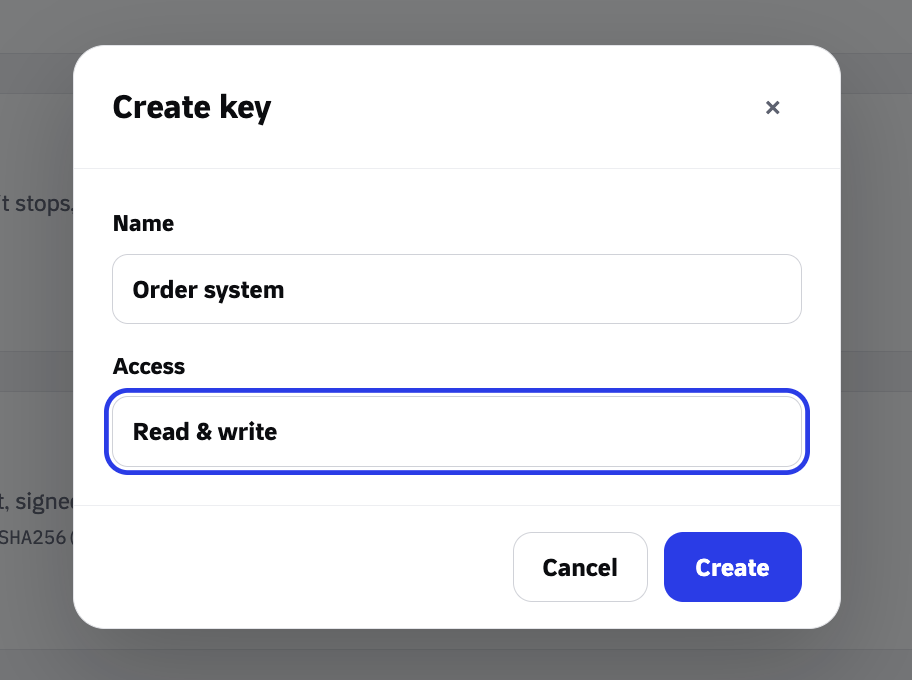
- Give the key a name that says which system uses it, for example Order system.
- Choose the access: Read to list incidents and see who is on call, or Read & write to also open, acknowledge and resolve incidents.
- Click Create. The full key (starting with
oc_) appears once, with a copy button. Copy it into your secret manager before closing the window.
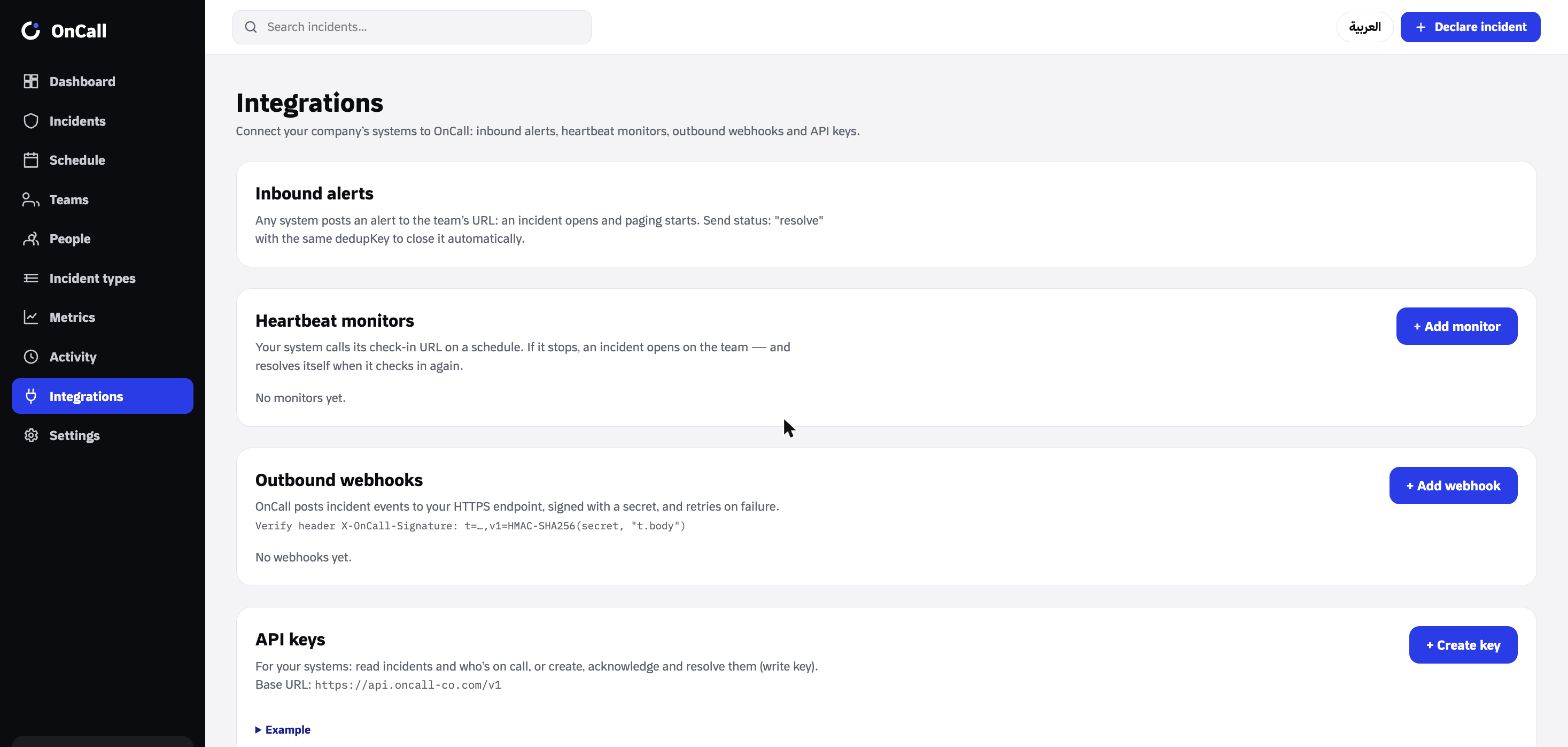
The key then appears in the list with its first characters, its access, and when it was last used. To stop a key working, click Revoke. Use a separate key for each system, so you can revoke one without affecting the others.
1 · Send alerts in
Opens an incident on the team that owns the key. The team's escalation rules decide who is paged and when it escalates.
| Field | Type | Description |
|---|---|---|
title required | string, ≤ 200 | Short summary shown in alerts and on the Lock Screen card. |
severity optional | enum | CRITICAL, HIGH, MEDIUM or LOW. Defaults to the incident type's default severity. |
description optional | string, ≤ 4000 | Details, links, error text. |
dedupKey optional | string, ≤ 200 | Your identifier for this problem. While an incident with the same key is open, repeat alerts are recorded on it instead of opening a new one. |
status optional | enum | trigger (default) opens. acknowledge or resolve act on the open incident with the same dedupKey, which is then required. |
curl -X POST https://api.oncall-co.com/ingest/TEAM_KEY \
  -H "Content-Type: application/json" \
  -d '{
    "title": "Payment gateway timeouts",
    "severity": "CRITICAL",
    "description": "p95 latency above 8s for 5 minutes",
    "dedupKey": "payments-gateway-latency"
}'curl -X POST https://api.oncall-co.com/ingest/TEAM_KEY \
-H "Content-Type: application/json" \
-d '{ "title": "Payment gateway recovered", "status": "resolve", "dedupKey": "payments-gateway-latency" }'Response
{ "incidentId": "cm…", "deduped": false, "action": "created" }| Status | Meaning |
|---|---|
201 | A new incident was opened (action: "created"). |
200 | Handled without a new incident: deduped, acknowledged, resolved, or ignored (no open incident matched the dedupKey). |
400 | Invalid body, or acknowledge/resolve sent without a dedupKey. |
404 | Unknown or disabled key. The answer is the same for every unknown key. |
429 | More than 60 requests in one minute for this key. Retry after a short wait. |
Monitoring tools
Point the tool's webhook at the team's link with the tool's name added. OnCall reads the tool's own payload, so no template is needed except for Datadog.
| Tool | Webhook URL | Behaviour |
|---|---|---|
| Prometheus Alertmanager | /ingest/{teamKey}/alertmanager | Each alert in alerts[] becomes one incident, keyed by its fingerprint. resolved resolves it. Severity comes from the severity or priority label. |
| Grafana alerting | /ingest/{teamKey}/grafana | |
| Datadog | /ingest/{teamKey}/datadog | Use the payload below. Recovered resolves the incident. |
| Uptime Kuma | /ingest/{teamKey}/uptime-kuma | Down opens a HIGH incident; up resolves it. |
{
  "title": "$EVENT_TITLE",
  "transition": "$ALERT_TRANSITION",
  "id": "$AGGREG_KEY",
  "priority": "$ALERT_PRIORITY",
  "message": "$EVENT_MSG",
  "link": "$LINK"
}
Up to 50 alerts are processed per request, and one request counts once toward the rate limit. The response lists one result per alert: { "results": [ { "incidentId": …, "deduped": …, "action": … } ] }. A payload with no alerts returns 400.
2 · REST API
Every /v1 request needs an API key. Read keys can list and fetch. Write keys can also open, acknowledge and resolve. Actions taken with a key appear in the incident timeline under the key's name.
| Method | Path | Key | Does |
|---|---|---|---|
| GET | /v1/incidents | read | List incidents, newest first |
| GET | /v1/incidents/{id} | read | One incident with its timeline |
| POST | /v1/incidents | write | Open an incident |
| POST | /v1/incidents/{id}/acknowledge | write | Acknowledge (stops escalation) |
| POST | /v1/incidents/{id}/resolve | write | Resolve with a note |
| GET | /v1/teams | read | Active teams |
| GET | /v1/teams/{id}/oncall | read | Who is on call for a team right now |
List incidents
Query parameters, all optional: status (TRIGGERED, ACKNOWLEDGED, RESOLVED), teamId, and limit (1 to 200, default 50).
curl "https://api.oncall-co.com/v1/incidents?status=TRIGGERED&limit=20" \
  -H "Authorization: Bearer oc_your_key"

# → { "data": [ …incidents ], "count": 20 }
Open an incident
| Field | Type | Description |
|---|---|---|
teamId | string | The team to page (from GET /v1/teams). Required unless categoryId is given. |
categoryId optional | string | An existing incident type. Its escalation chain decides who is paged. |
typeName optional | string, ≤ 120 | An incident type by name: reused if it exists, otherwise created on teamId. Ignored when categoryId is set. |
title optional | string, ≤ 200 | Defaults to the incident type's name. |
description optional | string, ≤ 4000 | Details. |
severity optional | enum | CRITICAL, HIGH, MEDIUM, LOW. |
assigneeId optional | string | Page this person directly instead of the on-call rotation. |
curl -X POST https://api.oncall-co.com/v1/incidents \
  -H "Authorization: Bearer oc_your_write_key" \
  -H "Content-Type: application/json" \
  -d '{ "teamId": "TEAM_ID", "title": "Card payments failing", "severity": "HIGH" }'
Acknowledge and resolve
Acknowledge takes no body. Resolve requires a resolutionNote (≤ 4000 characters).
curl -X POST https://api.oncall-co.com/v1/incidents/INCIDENT_ID/acknowledge \
  -H "Authorization: Bearer oc_your_write_key"

curl -X POST https://api.oncall-co.com/v1/incidents/INCIDENT_ID/resolve \
  -H "Authorization: Bearer oc_your_write_key" \
  -H "Content-Type: application/json" \
  -d '{ "resolutionNote": "Rolled back release 4.12" }'
Teams and on-call
GET /v1/teams
→ { "data": [ { "id": "…", "name": "Payments team", "nameAr": "فريق المدفوعات" } ] }

GET /v1/teams/{id}/oncall
→ { "teamId": "…", "onCall": { "id": "…", "fullNameEn": "Faisal Al-Harbi", "fullNameAr": "…", "source": "…" } }
→ { "teamId": "…", "onCall": null }   when nobody is scheduled
Errors
| Status | Meaning |
|---|---|
400 | The body failed validation. The response lists which fields. |
401 | Missing, unknown or revoked API key. |
403 | A read key was used for a write, or the workspace is suspended. |
404 | The incident or team does not exist in your workspace. |
3 · Webhooks
Add an HTTPS endpoint under Integrations → Webhooks and choose its events. OnCall sends a POST with a JSON body each time one happens.
| Event | Sent when |
|---|---|
incident.triggered | An incident opens |
incident.acknowledged | Someone takes it |
incident.escalated | It moves to the next escalation level |
incident.resolved | It is resolved |
incident.reopened | A resolved incident is reopened |
Content-Type: application/json
User-Agent: OnCall-Webhooks/1.0
X-OnCall-Event: incident.acknowledged
X-OnCall-Delivery: <delivery id>
X-OnCall-Signature: t=1793552400,v1=5d41402abc4b2a76b9719d911017c592…
{
  "event": "incident.acknowledged",
  "occurredAt": "2026-11-01T03:10:58.000Z",
  "incident": {
    "id": "cm…",
    "number": "INC-0142",
    "title": "Payment gateway timeouts",
    "severity": "CRITICAL",
    "status": "ACKNOWLEDGED",
    "escalationLevel": 2,
    "team": { "id": "…", "name": "Payments team" },
    "createdAt": "2026-11-01T03:07:12.000Z",
    "acknowledgedAt": "2026-11-01T03:10:58.000Z",
    "resolvedAt": null,
    "resolutionNote": null,
    "dedupKey": "payments-gateway-latency",
    "url": "https://www.oncall-co.com/incidents/cm…"
  }
}
Delivery and retries
Reply with any 2xx within 10 seconds. Anything else is retried after 30 seconds, 2 minutes, 10 minutes, 1 hour and 6 hours, then marked failed. Deliveries are stored, so a restart on our side does not lose them. Redirects are not followed, and the URL must be HTTPS on a public host. Use the Send test button to receive a ping event. Each webhook keeps a delivery log in the web app.
Because of retries the same delivery can arrive more than once. Use X-OnCall-Delivery to ignore duplicates.
Verify signatures
v1 is the hex HMAC-SHA256 of {t}.{raw body}, keyed with the webhook's secret. Compute it over the raw request body before parsing, compare in constant time, and reject timestamps older than 5 minutes.
import { createHmac, timingSafeEqual } from 'node:crypto';

export function verifyOnCall(secret, header, rawBody) {
  const parts = Object.fromEntries(header.split(',').map((p) => p.split('=')));
  const t = Number(parts.t);
  if (!t || !parts.v1 || Math.abs(Date.now() / 1000 - t) > 300) return false;
  const expected = createHmac('sha256', secret).update(`${t}.${rawBody}`).digest('hex');
  const a = Buffer.from(expected, 'hex');
  const b = Buffer.from(parts.v1, 'hex');
  return a.length === b.length && timingSafeEqual(a, b);
}import hashlib, hmac, time
def verify_oncall(secret: str, header: str, raw_body: bytes) -> bool:
parts = dict(p.split("=", 1) for p in header.split(","))
t = int(parts.get("t", 0))
if not t or "v1" not in parts or abs(time.time() - t) > 300:
return False
msg = f"{t}.".encode() + raw_body
expected = hmac.new(secret.encode(), msg, hashlib.sha256).hexdigest()
return hmac.compare_digest(expected, parts["v1"])4 · Heartbeats
Create a monitor under Integrations → Monitors with an interval (1 minute to 7 days) and an optional grace period (up to 24 hours). Then have your job call its URL each time it runs. Watching starts with the first check-in.
0 2 * * * /usr/local/bin/backup.sh && curl -fsS https://api.oncall-co.com/heartbeat/YOUR_TOKEN
If no check-in arrives within interval + grace, OnCall opens an incident on the monitor's team. The next check-in resolves that incident automatically. A paused monitor records check-ins but never opens incidents. Up to 30 check-ins per minute are accepted per token, and an unknown token returns 404.
Reference
| Value | Meaning |
|---|---|
TRIGGERED | Open; nobody has taken it yet, so escalation is running |
ACKNOWLEDGED | Someone has taken it; escalation has stopped |
RESOLVED | Fixed and closed |
CRITICAL · HIGH · MEDIUM · LOW | Severity, highest to lowest |
Monitoring tools that send their own severity words are mapped as follows: critical, crit, p1, sev1, emergency, fatal, disaster → CRITICAL; high, error, major, p2, sev2 → HIGH; warning, warn, medium, average, p3, sev3 → MEDIUM; low, info, minor, p4, p5 → LOW. Anything else uses the incident type's default severity.